 Vibkings Suite
 › Inventory › Guides
How to do a stock count in your shop
Your records say you have 48 tins of milk. The shelf has 45. Where did the other three go? You won't know until you count, and if you only count once a year, the small losses quietly add up to a big one.
A stock count (also called stock taking) is simple: you count what is physically in your shop and compare it with what your records say. Done properly, it shows you where money is leaking, which items are about to run out, and which ones are about to expire. This guide shows you how to do it step by step.
Free download: our stock count sheet in Excel, with columns for the item, shelf, quantity on record, counted quantity and the difference worked out for you.
1. Pick the right time
Count when nothing is coming in or going out. If you sell while you count, the numbers will never match. The best times are:
- After closing on a quiet day, or before opening in the morning.
- Sunday, if your shop is closed or slow.
- Before a big delivery, not just after one. Fewer goods means a faster count.
Tell your suppliers not to deliver during the count, and finish recording all of the day's sales, returns and purchases before you start.
2. Prepare your count sheet
Print your list of items, or open the template. For each item you need:
- The item name and code, so two similar items don't get mixed up.
- The unit you count in: piece, carton, pack, length. Decide this before you start. Counting "5" when you mean 5 cartons of 24 pieces is the most common stock count mistake.
- The shelf or location, so counters can work through the shop in order.
- An empty column for the counted quantity.
Leave the quantity on record off the sheets you give to counters. If people can see the expected number, they tend to "find" it.
3. Count shelf by shelf
Split the shop into areas: front shelves, back shelves, store room, warehouse. Give each area to one person or one pair, and work left to right, top to bottom.
- Count in pairs where you can: one person counts, the other writes. It is faster, and it stops one person from covering their own mistakes.
- Open cartons are loose pieces. Count full sealed cartons as cartons, then count opened cartons piece by piece.
- Mark each shelf when it's done, with a sticker or a tick on the sheet, so nothing is counted twice or missed.
- Separate damaged and expired goods as you go, and write them down on their own line. They are not sellable stock.
- Write down expiry dates for anything that expires, especially food, drinks, cosmetics and drugs.
4. Compare and recount the differences
Now put the counted quantity next to the quantity on record. The template works out the difference for you:
| Item | On record | Counted | Difference |
|---|---|---|---|
| Peak Milk Tin 400g | 48 | 45 | −3 |
| Kings Vegetable Oil 5L | 12 | 12 | 0 |
| EVA Soap | 60 | 64 | +4 |
Recount every item with a difference before you change anything. Many differences disappear on the second count. Someone missed a carton behind another one, or counted packs as pieces.
5. Find out why
For each difference that is still there after the recount, check:
- Sales that weren't recorded, or were recorded under the wrong item.
- Deliveries that were received but not entered, or entered with the wrong quantity.
- Returns and exchanges that went back on the shelf without a record.
- Transfers to another branch or warehouse.
- Damage, expiry and theft. If the same items keep coming up short, watch them closely.
A plus difference (more than recorded) usually means a sale was recorded twice, or a delivery was entered short. It's as important to fix as a minus.
6. Update your records
Change your records to match the count, so tomorrow starts from the truth. Write down the reason for each change and who approved it. Over a few counts, those notes tell you exactly where your stock is leaking.
How often should you count?
- Full count: everything in the shop, at least once a quarter.
- Spot counts: your 20 fastest-selling or most expensive items, every week or every month. These are where most losses happen.
- After a problem: a new staff member, a break-in, or a till that doesn't balance.
Do it faster with Vibkings Suite
A paper count works. But with stock software, most of the hard part is done for you:
- The quantity on record is always up to date. Every sale, purchase, return and transfer changes the stock as it happens.
- Count straight from your item list. Export your items to Excel, fill in what you counted, and import the file back. Each change is saved as a stock adjustment, with who made it and when.
- Expiry dates are already there. Each batch keeps its own date, and the Expiry Report shows what expires within 7 and 30 days.
- See what your stock is worth right after the count, with the Inventory Valuation report.
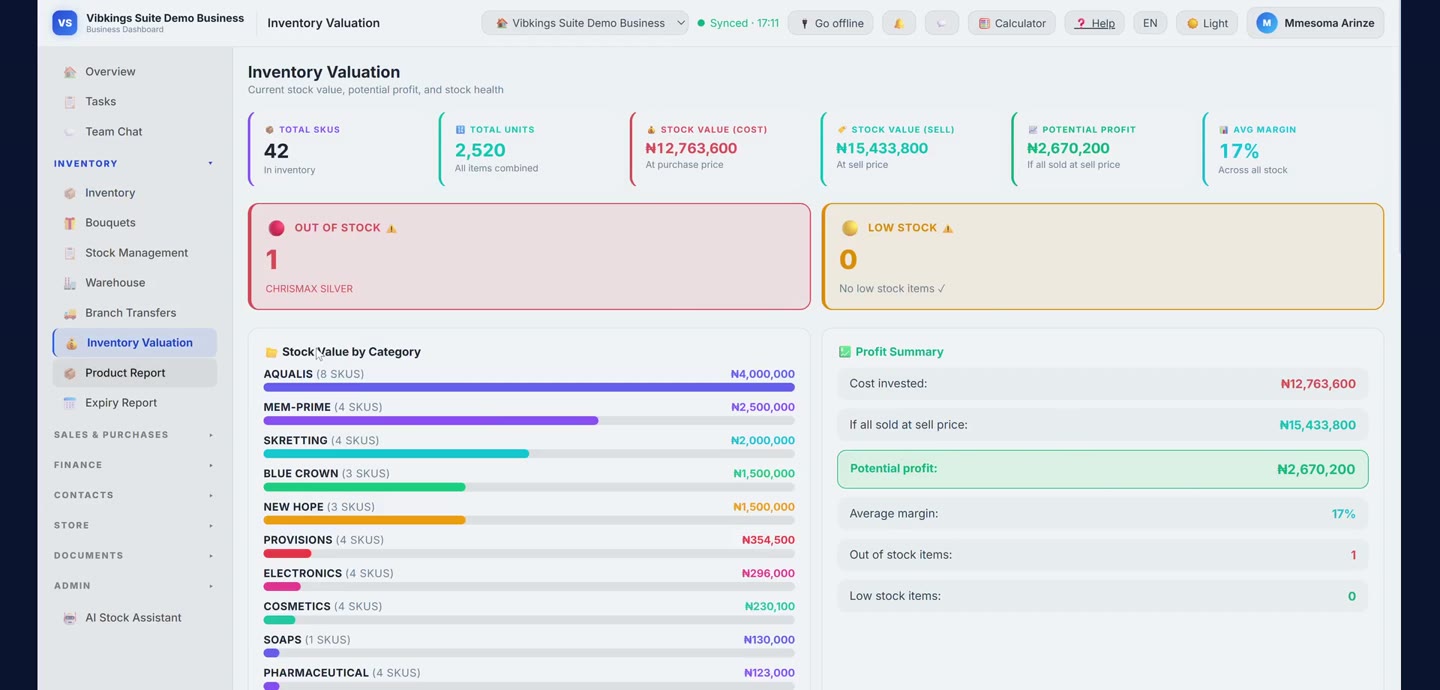
Inventory Valuation in Vibkings Suite. Sample data.
Try Vibkings Suite free for 7 days. No card needed.
Or read more about our inventory management software.
Questions
How often should a shop do a stock count?
Count everything at least once a quarter, and count your fast-moving and expensive items every week or every month.
Should I stop selling during a stock count?
Yes. Count after closing or before opening, so no goods come in or go out while you count.
What should I do when the count doesn't match my records?
Recount first. If the difference is still there, check recent sales, deliveries, returns and transfers, then update your records and write down the reason.